Office LTSC 2021 reaches end of support on October 13, 2026. After that date, Microsoft stops shipping security updates, bug fixes and technical support for it, and there is no Extended Support phase. Microsoft's supported paths forward are Microsoft 365 Apps or Office LTSC 2024.
That's the short answer to "when is Office 2021 end of life."
The harder question is what it means for your estate.
Most IT teams can name the deadline. Far fewer can say how many copies of Office LTSC 2021 are installed today, who actually uses them, or whether replacing every one of them is money well spent.
As budgets lock for 2027, that gap matters more than the date.
Office 2021 end of life at a glance
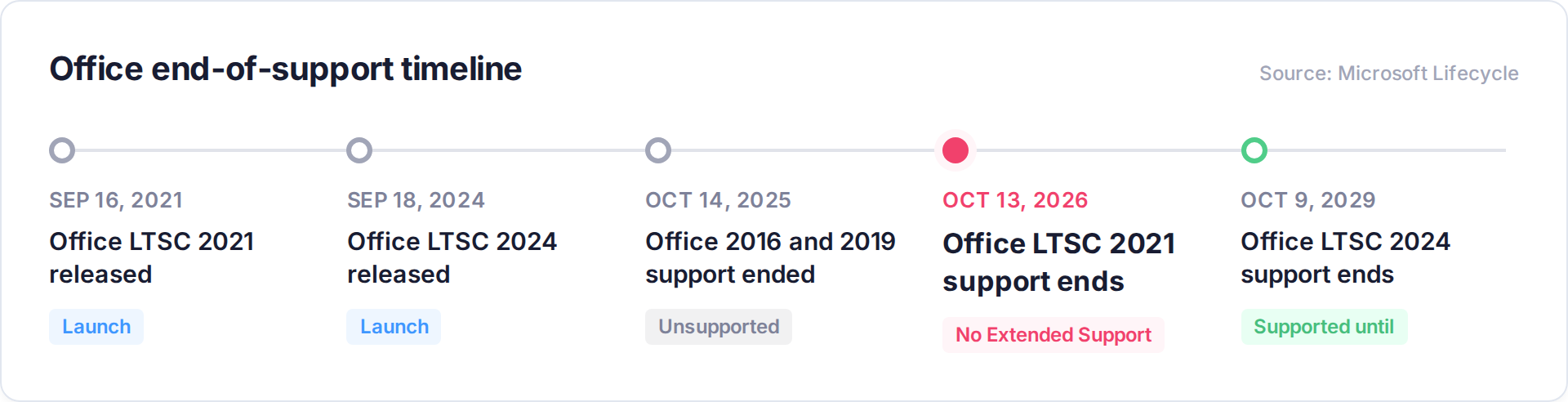
Dates are from Microsoft's Office LTSC 2021 end of support announcement and its guidance for upgrading older versions of Office.
If your estate still has Office 2016 or 2019 on it, those copies have been unpatched for almost a year. October 13 just adds 2021 to the pile.
What actually stops working after Office LTSC 2021 end of support
Nothing dramatic happens on October 14. Word still opens. Excel still calculates.
Here's what stops:
- Security fixes for newly discovered vulnerabilities
- Bug fixes
- Technical support from Microsoft
- Supported connectivity to Microsoft 365 services like Exchange Online, SharePoint and OneDrive
On that last point, Microsoft says older versions might still connect to Microsoft 365 services, but that connection isn't supported and can run into performance and reliability issues over time.
The part that catches teams off guard: Office LTSC 2021 follows Microsoft's Fixed Lifecycle Policy. There's no Extended Support phase, and Microsoft hasn't announced a paid security update program to buy time.
Every copy still running after October 13 is an unpatched document parser sitting in the one app every employee uses to open attachments.
The real risk isn't the date. It's the count.
Ask a lean IT team how many copies of Office are installed and you'll usually get a confident number.
Ask how many are LTSC 2021, how many are leftover 2019 or 2016, and which license each one is tied to, and the confidence drops fast. That's not a people problem. Office sprawls for predictable reasons:
- Volume license keys outlive the people who deployed them
- Mixed install methods (Click-to-Run, MSI, old golden images) report differently
- Retail copies get bought outside procurement
- Laptops that rarely connect never show up in the count
That count matters to three groups outside IT.
Security and cyber insurance. Unsupported software is a standard renewal question, and Office is on nearly every endpoint. Block 64's Security Risk Finder flags end-of-life software across the estate, not just Office.
Compliance. Most security frameworks expect vendor-supported, patched software. End-of-life apps turn into findings you have to explain. Staying ahead of that is what continuous license compliance is for.
Finance. Every replacement license is a line item. Buying 1:1 off a bad count means paying for devices that no longer exist and for people who don't need desktop Office at all.
Know your Office position before you buy a single replacement license
The Block 64 Microsoft License Review matches every Microsoft deployment to what you own and what people actually use, including every Office LTSC 2021, 2019 and 2016 install still on your network. In 30 days you get an Effective License Position, a costed action plan and 12 months of the Block 64 platform. One fixed price. We don't resell licenses, so the answer is never "buy more."
Button: See your Office exposure
Office LTSC 2024 vs Microsoft 365 Apps: which path fits which users
Microsoft gives you two supported options. The mistake is picking one for the entire company.
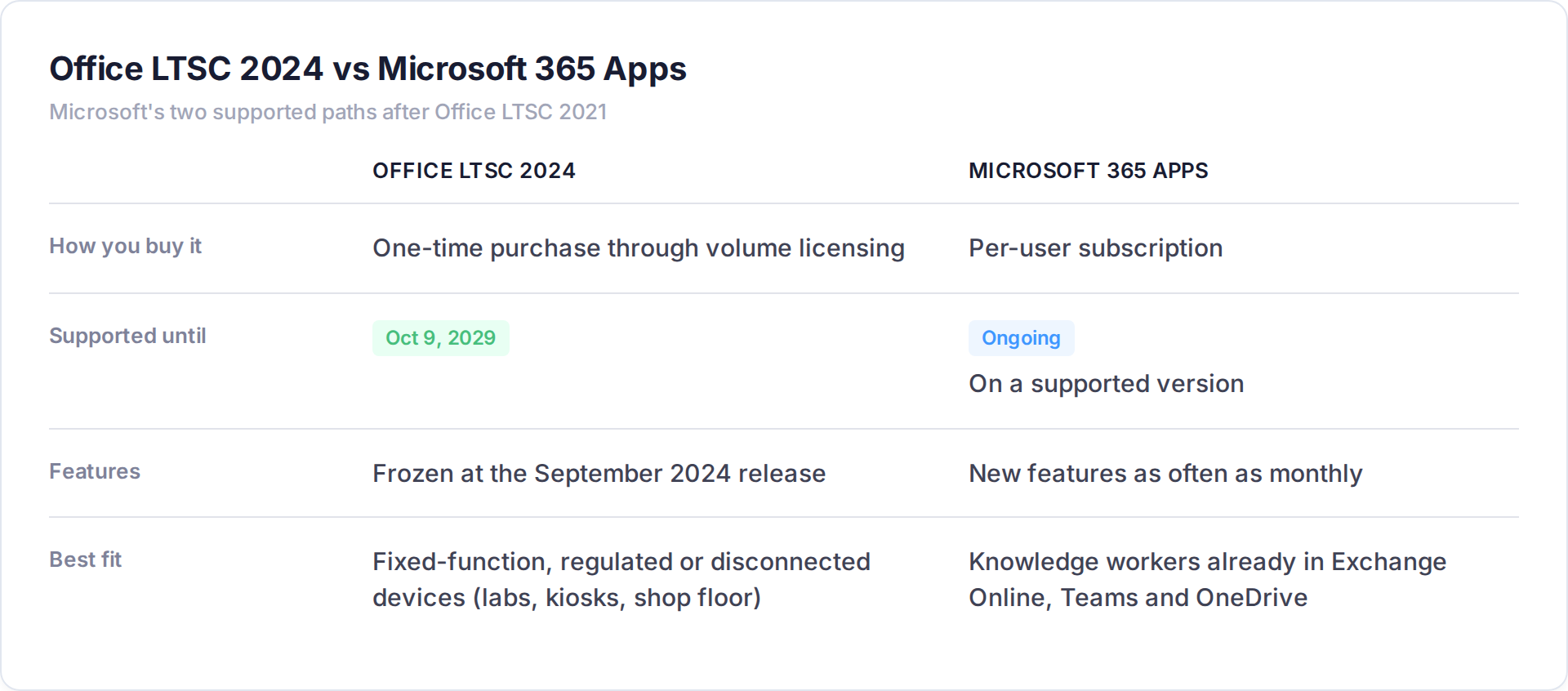
Office LTSC 2024 buys you three more years, then you're making this same decision again in 2029.
Microsoft 365 Apps ends the upgrade cycle, but it moves Office from a one-time cost to a per-user subscription. Multiply that across a 1,500-person org and the plan you pick for each group matters.
Then there's the third group nobody plans for: people who barely touch desktop Office. Frontline and light users may be fine on web and mobile apps, which cost less than a full desktop license.
The only way to split users into these groups is with real usage data.
A 5-step plan before the Office 2021 end of support date
- Count every install. Every Office version, every device, including the ones that rarely connect. Tie each install to an entitlement.
- Measure real usage. Who opened desktop Word, Excel or Outlook in the last 90 days? Who lives in the browser?
- Check compatibility. Macros, VBA, add-ins and line-of-business integrations break upgrades. Microsoft's upgrade planning guidance covers the readiness tools. Orgs with more than 150 licenses can also request help through Microsoft FastTrack.
- Decide per user group. LTSC 2024 for fixed-function devices, Microsoft 365 Apps for knowledge workers, web-only for light users. Retire the rest.
- Line it up with your renewal. If your Enterprise Agreement, CSP term or true-up lands in the next six months, bring your own numbers to the table.
Step two is where the money is.
Usage data routinely turns up licensed users who haven't opened desktop Word, Excel or Outlook in months. Every one of them is a replacement license you don't need to buy.
Office LTSC 2021 end of support FAQ
When is Office LTSC 2021 end of support? October 13, 2026.
Will Office 2021 stop working after end of support? No. It will still open and run. It stops receiving security updates, bug fixes and support, and its connection to Microsoft 365 services is no longer supported.
Is there extended support for Office LTSC 2021? No. It follows Microsoft's Fixed Lifecycle Policy, which has no Extended Support phase.
When does Office LTSC 2024 reach end of support? October 9, 2029.
Is Office 2021 the same as Office LTSC 2021? No. Office LTSC 2021 is the volume-licensed commercial version. Office 2021 is the retail one-time purchase. Both reach end of support on October 13, 2026.
Does Office 2021 end of support include Mac? Yes. Office LTSC 2021 for Mac reaches end of support on the same date.
Count first, buy second
The October 13 date is fixed. What you replace, and how many, is not.
Teams that count first and buy second spend less and close the security gap faster. Get your number before you get a quote.
For more on staying ready between renewals, see [LINK TO SOFTWARE LICENSE REVIEW PILLAR WHEN LIVE].
Get your Office LTSC 2021 exposure in writing
An independent Microsoft license review from Block 64 finds every Office install, matches it to what you own and shows who actually uses it. You get a costed, prioritized plan in 30 days, plus 12 months of platform access. $14,000 in value, one fixed price at a fraction of that.